Foreword:I believe that
Stepmania has a good guide. I think it gives you the basics on how to build a file within Stepmania that
functions, and I do suggest that you read the Stepmania guide. However, I think that pictures and an easier description go a long way. So, my attempt here is to break up explanation of the SM interface into sections instead of one really long description. If there is a word used that I believe the reader may be unfamiliar with (like syncing), I will define it in the section that it is used, and index all the definitions at the bottom of the post.
Example: sync, or syncing is when you match up the arrows with the beat. When the scrolling arrows do not match the beat, the song (and steps) are said to be "off-sync". Another word used in place of this is timing.I am going to assume that you know the basics of how Dance Dance Revolution, In the Groove, Stepmania, Flash Flash Revolution, etc. work. But, for the sake of argument, I am going to give you a "guide":
---
 Quarter Note: aka. 1/4 Note
This note is the most commonly used note in any four panel dancing game. It is the note that beginners first learn on, as it is timed to the bass beat of every song. If you see a song that has none of these notes in it, it is either really difficult, or not timed (synced) correctly.
---
 Eighth Note: aka. 1/8 Note
Eighth notes start appearing around difficulty level 3. As difficulty goes up, eighth notes become increasingly common. In some charts, they can outnumber quarter notes. They are timed to the "off beat"... which is the exact middle of two bass beats.
---
 Sixteenth Note: aka. 1/16 Note
Sixteenth notes start appearing around difficulty level 5. As difficulty goes up, they become increasingly common. In rare cases, they can outnumber quarter or eighth notes. These notes are situated between quarter and eighth notes. They are commonly used for *gallops* (think of a horse) and *runs* (an unbroken set of arrows strung together). At high levels, they are an important part of *stream* (a chart that has a lot of runs in it is referred to as a*stream* chart). For images, consult the index below.
---
 Twelfth Note: aka. 1/12 Note (also referred to as a "third" note - 1/3)
Twelfth notes start appearing around difficulty level 6. They are relatively rare in official songs, but when used, they are often paired to a "swing beat". Examples include, but are not limited to: Heaven is a '57 metallic gray [DDR], and We Know What to Do [ITG].
Other notes:
Since this is an introductory section, I will leave explanation of the other notes for later. Unless you are considering making a very challenging song, these four notes should be enough.
---
---
The SM interface
If you are trying to edit a song, you should see a screen that looks like this (or similar):
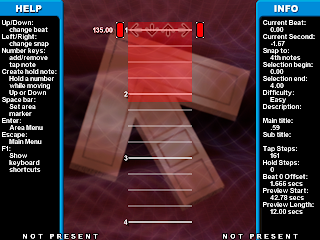
Let's zoom in on a few key parts:
 Snap Guide
: This is what you use to insert arrows, holds, mines, rolls, changes in BPM, and stops. Think of it like a pointer. You can toggle this pointer by hitting the left or right arrow keys. This will change what notes you can insert. To figure out what note you are inserting, look at the top right where it says "snap to:".
135.00 This is the BPM (beats per minute). To change this, you need to have the snap guide lined up with this number. This can be changed by hitting F7 or F8.
Current Beat: This is where you are on your chart. If you are at the beginning, it will say 0.00.
Current Second: This is what the music offset is. Adjusting this changes the "sync". You can do this by hitting F11 or F12.
F1: Toggles the keyboard shortcuts... this screen is very useful.
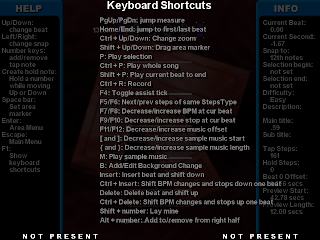
Selection Begin/ Selection End: When you hit spacebar, you will be able to create and drag a highlight a part of the screen. After you do this, hit P. Stepmania will only play the selection highlighted. Using this can really cut down on the time it takes to make a song - because you won't have to play the whole song to view what you are doing.
F4: Toggles *assist tick*. Using this helps in making sure your steps are synced/timed well.
Difficulty: This is the difficulty type that you have chosen to edit. Depending on what version you are using, this may have different names. There are five difficulties you can select for editing. Here is a list of difficulties and what they may be called:
ITG Difficulty (color) / DDR Difficulty (color)
Novice (
light purple) / Beginner (
light blue)
Easy (
green) / Basic (
yellow) / Light (
yellow)
Medium (
yellow) / Trick (
red) / Standard (
red)
Hard (
red) / Maniac (
green) / Heavy (
green) / Expert (
green)
Expert (
blue) / S-Maniac (
purple) / Oni (
purple)/ Challenge (
purple)
When you want to create a new blank chart under a certain difficulty, go to the edit menu and select the song you want to edit. Then go down and select the new difficulty you want to make and hit ENTER. A new difficulty will be created for you, and you can go into the edit screen to add notes for that difficulty.
If you want to delete notes, use the delete button. Each time you hit delete, the notes will shift up by one 1/4 space. If you want to delete the whole selection quickly, hold DELETE and the TAB key.
If you make any changes, don't forget to save! Hit Escape, and select SAVE.
Play around with the tools a little bit and see how they work. In the next post, I will get into how things work into greater detail, as well as some advanced features.
Keep on Stompin'~-N8


